Gallery
- 4.2
- Rating
- 1.00B
- Installs
- Free
- Price

 Analysis by App-foxy
I usually judge a photo app less by its first impression than by what happens after the novelty wears off. A gallery can look pleasant during the first few minutes and still become frustrating once thousands of pictures, screenshots, downloads, and short videos begin to pile up. Gallery, the photography app from Google LLC, takes a simpler route. It is free, aimed at everyone, and built around the everyday job of helping me find, view, and manage personal media without turning that job into a project.
That simplicity is the main reason I can imagine recommending it to a friend. It does not ask me to become a photography expert before I can use it. At the same time, its light approach means I have to accept fewer tools than I would get from a full cloud-photo service or a manufacturer’s feature-heavy gallery. My experience with it is therefore less about spectacular editing and more about whether it remains useful as a dependable daily shelf for pictures and videos.
What feels good during the first week
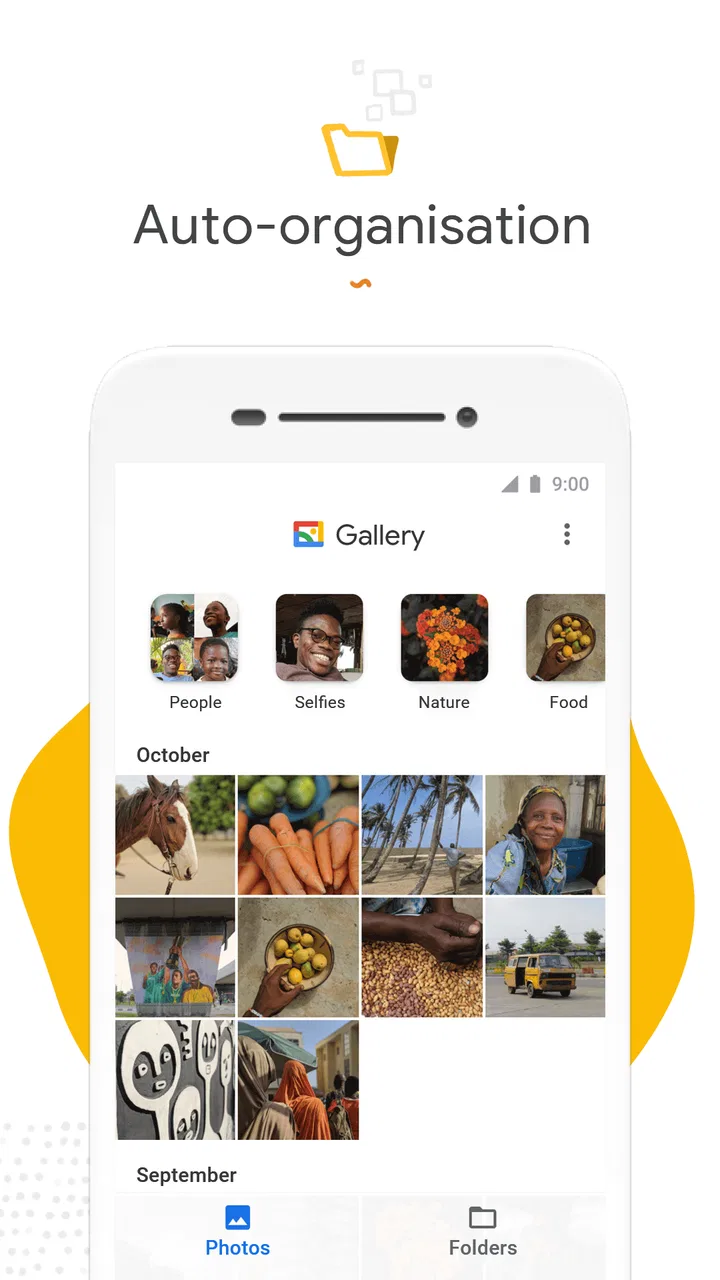
During the first week, the appeal is easy to understand. Gallery opens with a clear purpose: show my photos and videos in a way that feels quick to browse. The store presents it as smart, light, and fast, and that description matches the basic character I noticed in use. The interface does not feel like a social network, an editing studio, or a backup dashboard. It feels like a place I can open when somebody asks me to find a picture.
In-Depth Coverage of Gallery
That distinction matters on a phone. I often do not want to adjust color, create an album, or share a memory with a service. I simply want to check whether a picture is there, enlarge it, move through nearby shots, or send it to another person. A focused gallery reduces the number of decisions between opening the app and reaching the image I need. For casual users, that can be more valuable than a long list of advanced controls.
The app is also approachable for a mixed household. Its Everyone content rating makes sense because the basic experience is suitable for ordinary family use, including someone who is not comfortable learning a complicated photo manager. The minimum operating system is Android eight or later, so compatibility is worth checking before installing it on an older phone. On a supported device, the free price removes the usual hesitation of trying it and deciding later whether it deserves a permanent place.
One useful first-week habit is to test the app with different kinds of media rather than only recent camera pictures. I would open a screenshot, a downloaded image, a picture received in a messaging conversation, and a short video. That small test tells me whether Gallery fits the way I actually collect media. A gallery that works beautifully for camera images but makes screenshots or downloads awkward may not be the right everyday choice, even if its opening screen looks clean.
I also recommend using the first week to notice how quickly I can return to a photo after leaving it. That sounds minor, but repeated retrieval is the real gallery workload. If I am showing a receipt, finding a travel image, or checking a picture before sending it, the number of taps and the clarity of the browsing flow matter more than decorative presentation. Gallery’s strongest early impression is that it keeps this basic task close to the surface.
Where the lightweight approach helps
A lighter gallery is especially useful on a phone that already has several demanding apps. I do not need another service constantly competing for attention when all I want is local browsing. The smaller mental footprint is valuable too: I can treat the app as a utility instead of maintaining another timeline, subscription, or collection system.
That makes it a sensible choice for people who take pictures but do not want to organize their lives around them. Parents checking school notices, travelers reviewing the day’s shots, and anyone who frequently needs to show a saved image can benefit from a direct gallery. I would also consider it for a secondary device where I want a straightforward way to inspect media without building a larger photo workflow.
There is a less obvious benefit to this kind of focus. When a gallery is not trying to become a complete memory platform, I am less tempted to spend time polishing every folder or reacting to automatic suggestions. The app can stay in the background until I need it. That quietness is part of its first-week appeal, particularly for users who find elaborate photo ecosystems distracting.
Why it can remain useful from month to month
Long-term value comes from repetition, not surprise. After the first week, I stop caring whether the interface feels new and start asking whether it helps with the same small tasks every month. Gallery earns its place when I can use it as a reliable checkpoint for media: review what I captured, locate something someone sent me, and decide what is worth keeping or sharing.
A realistic example is preparing for a family appointment. I might need to find a document photographed earlier, compare two pictures of a product, and send the clearest version to another person. With a gallery-first app, I can move through those tasks without opening a separate editing or social application. The value is not dramatic, but it is recurring. Those tiny moments are exactly where a simple tool can become part of a habit.
Another useful workflow is a quick weekly review. I can look back at recent media, remove obvious mistakes when my phone’s normal file controls allow it, and share the few images that matter. The important point is to keep the review short. Gallery works better as a practical viewing and selection point than as a promise to transform a disorganized camera roll into a perfectly cataloged archive.
You May Also Like

 Lords Mobile: Kingdom Wars
Lords Mobile Is a Kingdom-Building Routine, Not a Quick Match
A case-by-case verdict on the building, battles, device demands, and social commitments that make Lords Mobile rewarding for some players and exhausting for others.

 PDF Scanner app - TapScanner
TapScanner Makes Paperwork Easier to Capture, Check, and Share
TapScanner makes scanning with a phone feel less like a rescue operation and more like a dependable step in getting work done. Its capture tools are useful, though not flawless.

 Block Blast!
Block Blast! Shows How Much a Puzzle Game Can Leave Out
A quiet grid game shows why puzzle players increasingly value instant clarity, repeatable skill and low-pressure play—and where the genre still needs to catch up.

 Family Space
Family Space Review: A Shared Routine That Makes Family Life Easier
A parenting app earns its place not by adding more noise, but by making everyday coordination easier. Family Space gets that balance mostly right.

 1Weather Forecasts & Radar
1Weather Forecasts & Radar Makes the Daily Check Worthwhile
A good forecast does more than predict rain. This week's pick turns changing conditions into a clear, practical reason to check before you step outside.

 Clash of Clans
Clash of Clans Makes Patience Part of the Strategy
A village builder with a sharp tactical core, Clash of Clans turns patience into momentum and each raid into a small, satisfying act of judgment.
More From Our News Desk
View All News


That limitation is also a trade-off. People who want extensive cloud synchronization, sophisticated search, collaborative albums, or deep editing may find a dedicated photo platform more suitable. Gallery’s recurring value is strongest when my expectations are modest and concrete. It can be the front door to my media, but I should not assume that a clean browsing experience replaces a full backup and organization strategy.
The public response suggests that this straightforward role resonates widely. Gallery has an average rating of around 4.2 from roughly 602 thousand ratings, and it has passed one billion installs. Those figures do not prove that it will suit every phone or workflow, but they do show that the app has become a familiar option for a very large audience. I read that popularity as evidence of practical usefulness rather than a reason to overlook its boundaries.
Its release history also gives the app a clear identity. It first appeared in July 2019, and the current version is listed as 1.9.3.913579239 release. I would pay attention to the version available for my device rather than assuming every phone presents exactly the same experience. More importantly, I would judge it over several weeks: does it help me find things, does it stay understandable, and does it avoid creating extra maintenance work?
Three habits that make the app more useful
First, I would separate “finding” from “archiving.” When I open Gallery, I decide whether I am looking for a picture now or managing what should remain on the phone. Mixing those jobs often leads to endless scrolling. If I need a long-term archive, I use a separate backup plan; if I only need a quick reference, I avoid spending time building a perfect collection inside the gallery.
Second, I would use a consistent naming or folder habit outside the app when a picture has future importance. A photographed receipt, warranty, or travel document is easier to recover when I give it a meaningful place in my broader phone storage workflow instead of trusting memory alone. Gallery can help me view the item, but the habit of labeling important files is what makes the result durable.
Third, I would review screenshots deliberately. Screenshots are often the fastest source of clutter because they are created for temporary reasons and then forgotten. Once a week or after finishing a project, I would inspect them through Gallery and remove the ones that no longer serve a purpose. This is a small routine, but it prevents the gallery from becoming a record of every fleeting instruction, message, and comparison.
Maintenance is light, but not automatic
The maintenance burden is lower than with a full photo ecosystem, but it is not zero. A gallery can display media; it cannot decide which memories are meaningful for me. If I never review screenshots, duplicate shots, downloads, or accidental recordings, the app will eventually reflect that neglect. The interface may remain simple while the contents become harder to navigate.
I find it helpful to think of Gallery as a window rather than a housekeeper. It gives me access to what is on the device, but the responsibility for keeping that space usable remains mine. A short, regular cleanup is more realistic than an ambitious one-time sorting session. I would rather spend a few minutes dealing with recent clutter than postpone everything until I have an overwhelming backlog.
Storage decisions deserve special care. Deleting a picture from a phone can be a meaningful action, especially when the image exists nowhere else. Before removing anything important, I would confirm that I have another copy or that I am comfortable losing it. This is not a criticism unique to Gallery; it is a general risk whenever a gallery sits close to file management. The app’s simplicity should not encourage careless deletion.
For the same reason, I would not treat a visually tidy gallery as proof that my memories are protected. A local viewer and a backup service solve different problems. If my photos matter, I need a separate plan for preserving them. Someone who wants one app to browse, edit, synchronize, search, and safeguard everything may be happier with a broader alternative, even if that alternative feels heavier.
Maintenance also includes keeping expectations realistic about organization. I would not install Gallery expecting it to understand every personal category automatically or to replace a carefully planned folder system. Its value is greatest when I want low-friction access. Once my library becomes a serious archive for work, business records, or a large creative project, a more structured tool may save time despite requiring more setup.
Where long-term fatigue can appear
The first source of fatigue is repetition without enough structure. Browsing recent media is easy, but finding an older image can become less pleasant if I have not developed a personal method for storing important items. A clean interface cannot completely solve a messy library. The app may feel fast while I am looking at the newest pictures, then less satisfying when I need something from months ago.
The second source is the gap between viewing and editing. If I regularly need detailed adjustments, precise cropping, text removal, or creative effects, I will keep reaching for another app. Gallery can remain useful as the place where I inspect the result, but it may not be the center of my photography workflow. That extra handoff is harmless for occasional edits and tiring for someone who edits every image.
The third is the difference between local convenience and connected photo services. People who share albums with relatives, move between several devices, or rely heavily on automatic online access may prefer a service designed around synchronization. Gallery’s directness is an advantage when I want a simple device gallery; it is a disadvantage when my main need is a connected library available everywhere.
There is also a personal fatigue factor. Some users enjoy a feature-rich photo app because it surfaces memories, suggestions, and creative possibilities. Others experience those features as noise. Gallery will suit the second group better. If I want my app to actively inspire me, organize events, or encourage frequent revisiting, I may find the restrained experience too quiet after the initial satisfaction of simplicity.
The best way to decide is to match the app to the kind of friction I dislike. If my current gallery is slow, confusing, or overloaded with features, Gallery’s focused design may feel refreshing. If my current problem is poor backup, weak cross-device access, or demanding editing, changing galleries may not address the real issue. In that case, a stronger alternative in those specific areas is the better investment.
Who should keep it and who should move on
I would recommend Gallery to someone who wants a free, uncomplicated way to browse photos and videos on a supported Android phone. It is particularly well suited to casual photographers, families, and users who value a quiet utility over a large ecosystem. The age rating of Everyone reinforces that broad, everyday positioning, while Google LLC gives the app a recognizable developer behind it.
I would be more cautious recommending it to a professional photographer, a heavy editor, or anyone whose main requirement is a complete online archive. Those users should compare it with alternatives that specialize in advanced editing, extensive search, collaborative sharing, or backup. Gallery can still be useful alongside such tools, but I would not make it the sole answer to a demanding media workflow.
For a new user, my practical setup would be simple: install it on a compatible device, test several media sources, use it for ordinary retrieval during the first week, and then observe whether it reduces or adds friction. After a month, I would ask whether I am opening it naturally when I need a picture, whether screenshots are under control, and whether my important images have protection beyond the phone itself.
That test avoids being dazzled by the first impression. A gallery deserves lasting space when it becomes invisible in the best way: I open it, find what I need, and move on. It should not demand a daily maintenance ritual, but it should support a small cleanup habit so the library does not slowly become unmanageable.
My final view is favorable, with a clear condition. Gallery earns lasting value through dependable simplicity, not through an endless stream of features. I like it as a straightforward photography utility that stays out of the way and handles the ordinary moments that fill a phone. I would keep it installed if my priorities were quick browsing, low complexity, and a free experience for everyday media.
However, I would pair that recommendation with one honest warning: do not confuse a convenient gallery with a complete photo strategy. If you need serious editing, rich organization, or dependable cross-device preservation, choose a more specialized alternative for those jobs. For everyone else, Gallery is a sensible long-term companion precisely because it asks little from me while remaining useful whenever a photo or video needs to be found.
FAQs for Gallery
01What features does the Gallery app offer?
The Gallery app provides a user-friendly interface to organize, view, and edit photos and videos. It includes features like automatic sorting by date, customizable albums, and basic editing tools such as cropping and filters. Users can also create slideshows and share media directly from the app.
02Is the Gallery app compatible with all devices?
The Gallery app is designed for compatibility with most Android devices, but it’s important to check the specific requirements on the Google Play Store or App Store. Ensure your device’s operating system is up-to-date to avoid any compatibility issues and enjoy all features smoothly.
03How does the Gallery app handle privacy and security?
The Gallery app prioritizes user privacy by allowing you to set up secure folders for sensitive media, protected by a password or biometric authentication. Additionally, it does not automatically upload your photos to the cloud, giving you control over your data and media sharing preferences.
04Can I back up my photos using the Gallery app?
While the Gallery app itself may not offer direct cloud backup, it usually integrates with cloud services like Google Photos or iCloud. This allows you to seamlessly back up your media online, ensuring your photos and videos are safely stored and easily recoverable in case of device loss or damage.
05Does the Gallery app support photo editing?
Yes, the Gallery app includes a range of basic photo editing tools. Users can adjust brightness, contrast, and saturation, apply filters, and crop or rotate images. While it may not replace advanced editing software, it offers sufficient options for quick and simple edits directly within the app.
Pros
- User-friendly interface with intuitive navigation.
- Efficient photo organization with albums and tags.
- Supports various media formats seamlessly.
- Fast image loading and smooth scrolling.
- Customizable themes for a personalized look.
Cons
- Limited cloud storage integration options.
- Occasional ads may disrupt user experience.
- Lacks advanced editing tools for photos.
- No built-in slideshow feature for albums.
- Some features require in-app purchases.

Gallery
Gallery